We tested 12 of the best digital business cards in 2026. Here’s our honest review

- TL;DR
- 1. Taplink: Personal and team presentation with advanced card branding
- Our experience using Taplink
- Who Taplink is best for
- Pros
- Cons
- Pricing
- 2. Blinq: Basic offline contact exchange
- Our experience using Blinq
- Who Blinq is best for
- Pros
- Cons
- Pricing
- 3. HiHello: Professional networking for teams and individuals
- Our experience using HiHello
- Who HiHello is best for
- Pros
- Cons
- Pricing
- 4. Wave Connect: NFC networking for teams and individuals
- Our experience using Wave Connect
- Who Wave Connect is best for
- Pros
- Cons
- Pricing
- 5. Mobilo: Networking and lead management for sales managers
- Our experience using Mobillo
- Who Mobilo is best for
- Pros
- Cons
- Pricing
- 6. Popl: Corporate use and lead management
- Our experience using Popl
- Who Popl is best for
- Pros
- Cons
- Pricing
- 7. Uniqode: Corporate use with analytics
- Our experience using Uniqode
- Who Uniqode is best for
- Pros
- Cons
- Pricing
- 8. V1ce: Business presentation and lead management
- Our experience using V1ce
- Who V1ce is best for
- Pros
- Cons
- Pricing
- 9. Tapni: Quickest creation of a digital business card
- Our experience using Tapni
- Who Tapni is best for
- Pros
- Cons
- Pricing
- 10. Dot: Personal use and NFC networking
- Our experience using Dot
- Who Dot is best for
- Pros
- Cons
- Pricing
- 11. Haystack: Creation of a minimalist professional card
- Our experience using Haystack
- Who Haystack is best for
- Pros
- Cons
- Pricing
- 12. Kado: Basic lead management right in the dashboard
- Our experience using Kado
- Who Kado is best for
- Pros
- Cons
- Pricing
- So, which digital business card app is the best?
- FAQ
- What are the best digital business card apps?
- What are the best free digital business cards?
- How do I create a digital business card?
- Is my lead data secure in a digital business card app?
- Does my QR code or link change when I edit my digital business card?
- Do I need a new NFC device if I edit my digital business card?
- Can a digital business card collect contacts?
- Can I sell products or services through a digital business card?
Digital business cards (also known as virtual business cards, electronic business cards, online business cards, or smart business cards) are no longer just a replacement for paper ones. They let you do more than share contact information. You can create branded pages for yourself or your company, collect leads, store contacts, and automate follow-ups.
Choosing the right tool depends on your goals. That’s why we tested 12 top digital business card apps for you — from basic to advanced — reviewed their features and identified the use cases where each one performs best.
Below is a quick summary of the key features of the best digital business card apps from our review.
| Tool | Best for | Sharing options | Built-in analytics | Built-in CRM | Free plan | Pricing for individual users | Pricing for teams |
| Taplink | Personal and team presentation with advanced card branding | QR code, link, NFC device | ✅ | ✅ | ✅ | $0–8 a month | $0–8/month (per user or per entire team depending on the creation option) |
| Blinq | Basic offline contact exchange | QR code, email, SMS, Apple Watch and phone widget; NFC device, Apple/Google wallet | ❌ | ✅ | ✅ | $0–7.33 a month | $4.99/month per user |
| HiHello | Professional networking for teams and individuals | QR code, link, email, SMS, Apple Watch and phone widget, NFC device, Apple/Google wallet | ✅ | ✅ | ✅ | $0–6 a month | $5/month per user |
| Wave Connect | NFC-based networking for teams and individuals | QR code, link, email, SMS, Apple Watch and phone widget, NFC device, Apple/Google wallet | ✅ | ✅ | ✅ | $0–7 a month | $5/month per user |
| Mobilo | Networking and lead management for sales managers | QR code, link, NFC device, Apple/Google wallet | ✅ | ✅ | ❌ | $3 a month | $4–5/month per user |
| Popl | Corporate use and lead management | QR code, link, email, SMS, Apple Watch and phone widget, NFC device, Apple/Google wallet | ✅ | ✅ | ✅ | $0–11.99 a month | $4/month per user |
| Uniqode | Corporate use with analytics | QR code, link, email, NFC device, Apple/Google wallet | ✅ | ✅ | ✅ | $0 | $4/month per user |
| V1ce | Business presentation and lead management | QR code, link, email, SMS, NFC device, Apple/Google wallet | ✅ | ✅ | ✅ | $0 or $100 one-time | $66 a month (regardless of the number of cards) |
| Tapni | Quickest creation of a digital business card | QR code, link, phone widget, NFC device, Apple/Google wallet | ✅ | ✅ | ✅ | $0 | $4.99–49.99/month per user |
| Dot | Personal use and NFC networking | QR code, link, NFC device, Apple/Google wallet | ✅ | ✅ | ✅ | $0–12 a month | From $8/month or from $12/month per user (depending on the team size) |
| Haystack | Creation of a minimalist professional card | QR code, link, email, SMS, phone widget, NFC device | ✅ | ❌ | ✅ | $0 | $2.5–4.5/month per user |
| Kado | Basic lead management right in the dashboard | QR code, link, phone widget, NFC device, Apple/Google wallet | ✅ | ✅ | ✅ | $0 | $2.5–4/month per user |
Taplink began as a link in bio tool, but later grew into a builder for mobile websites, landing pages, and digital business cards.
Taplink goes beyond traditional digital business card apps that focus mainly on exchanging contact information. With this tool, a business card becomes a presentation page: you can describe yourself and your business, show services and products, and even receive inquiries.
Section of the Taplink homepage

When it comes to content and design, Taplink feels significantly more advanced than most digital business card apps in this list.
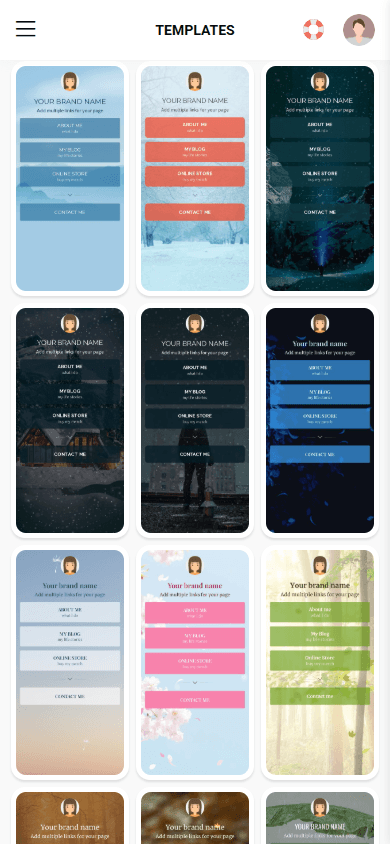
First, it has 100+ templates, from simple pages with buttons to mini landing pages. You can see some of them in the first screenshot. Taplink is the only tool in this list that offers templates with ready-made content. You can simply replace it with your own information or generate new copy with AI. With pre-made content already in place, you can build a card in just 5 minutes.
Digital business card templates, a card editor, and content blocks in Taplink
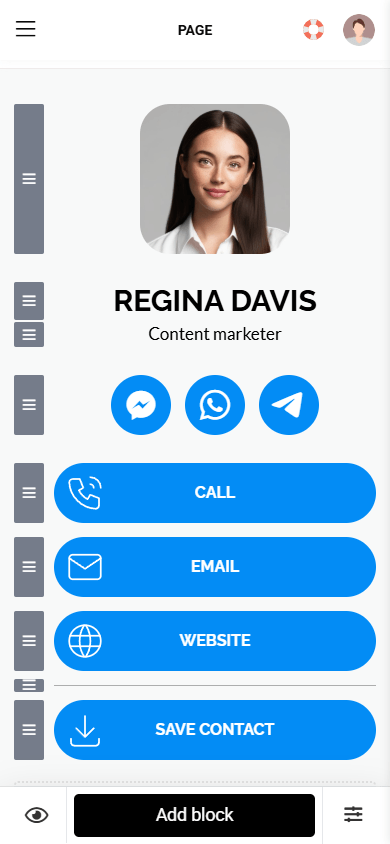

Second, it offers the most content options of any other tool on this list. Beyond contact details and basic info, you can add videos, images, maps, FAQs, step-by-step sections, and more. You can see some blocks in the third screenshot. This makes the card more than a contact-sharing tool — it explains who you are, what you do, and why people can trust you.
Third, customization is where Taplink really stands out. It offers 200+ design themes. You can customize layout, fonts, text size, button styles, and animations. You can build a card that fully matches your brand, as we did above.
To track performance, Taplink offers built-in analytics: views, clicks, and conversion rate. It also includes a built-in CRM.
Taplink takes a unique approach to creating multiple business cards for teams. There are two options:
- You can create multiple business cards under a single account and assign a separate pricing plan to each one.
- On the Business plan, you can create one main card and use subpages as additional business cards. All cards will share one unified design style. You can create up to 512 cards via subpages while paying for just one Business plan. For teams, this is more cost-efficient than paying for a separate plan for every card.
One feature Taplink lacks is automatic lead-capture pop-ups. In other tools, the form usually appears after a person saves your contact. In Taplink, you’ll need to add a lead form manually if the template doesn’t already include one. The form will be displayed as a separate block on the card page.
For beginners, Taplink may feel slightly more complex, but this is offset by detailed guides, video tutorials, and live chat support.
| Content options | Personal and company details, email, phone number, text, links, images, videos, music, FAQ, price lists, pricing plans, subscription/lead capture forms, countdown timers, digital products |
| Customization | 100+ templates with ready-made content, 200+ design themes; background, font, and button color customization; font editing, element sizing, button style selection, button animations, lead capture form customization |
| Built-in analytics | Yes: views, clicks, conversion rates |
| Built-in CRM | Yes: view contacts, manage statuses, export data, set up an automatic follow-up email after capturing a lead |
| Integrations | For CRM, email, analytics, sales, advertising, including Google Analytics, Mailchimp, Meta Pixel, GetResponse, MailerLite, Kommo, Brevo |
| NFC devices provided | No |
| Sharing options | QR code, link, NFC device |
| App available | No |
| Other important features | Custom domain support, zero-fee digital product sales tools, AI for generating an entire card or card copy |
Taplink works great for individual users and teams of any size. It’s also the best digital business card app for those looking for a branded business card to showcase themselves, their company or services.
- ✅ Many content formats.
- ✅ Highly flexible design customization.
- ✅ AI-powered card generation in 1 minute.
- ✅ You can structure your card as a simple sales funnel.
- ✅ Unlimited business cards on the free plan.
- ❌ The lead capture form doesn’t pop up automatically and appears as a separate block on the page.
- ❌ May feel complex for beginners.
Unlike most competitors, Taplink doesn’t offer separate plans for individuals and teams. Any of the plans works for both use cases.
- Basic: $0.
- Pro: $4 a month.
- Business: $8 a month.
More on Taplink pricing.
Blinq is a minimalist digital business card maker designed for in-person networking at conferences, meetings, and events.
Section of the Blinq homepage

The platform is built around simplicity. You build a card on a single screen, and the feature set stays basic. Blinq doesn’t even include built-in analytics, but given its popularity, many users don’t seem to mind.
Indeed, Blinq was extremely easy to use. The interface is intuitive: it’s clear where to click and what to configure. It took us just about two minutes to create a digital business card.
Dashboard, a card editor, and content blocks in Blinq
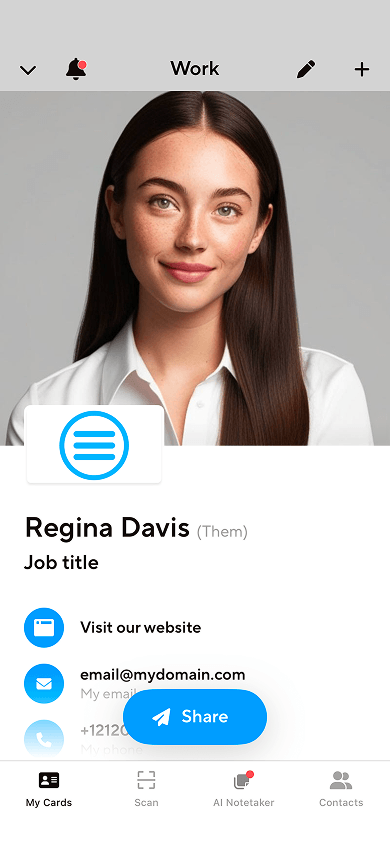
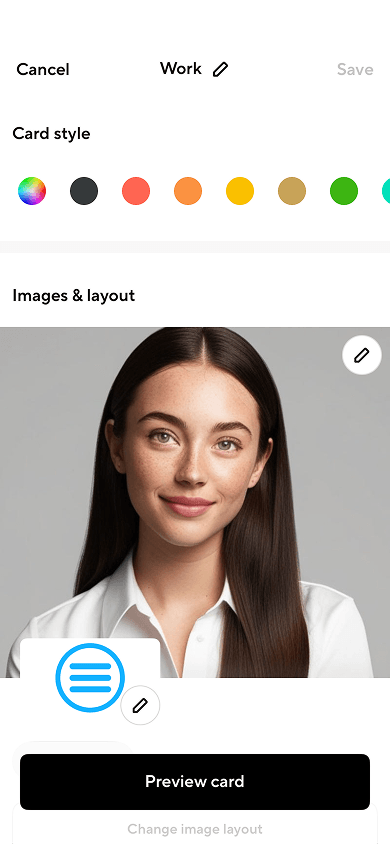

Design options are also minimal. You can only choose a header layout and icon colors. That’s all.
Integrations can partly cover some missing features. For example, you can use Zapier to connect Google Analytics and compensate for missing statistics. The same goes for CRM functionality: if the built-in CRM isn’t enough, you can connect external tools.
| Content options | Personal and company details, email, phone number, business address, links |
| Customization | 8 header layouts, icon color customization |
| Built-in analytics | No |
| Built-in CRM | Yes: view contacts, AI-powered list enrichment, add notes and tags, export data |
| Integrations | For CRM, SSO, email, and automation, including Salesforce, Zapier, HubSpot, Slack, Pipedrive, Google Workspace |
| NFC devices provided | Yes |
| Sharing options | QR code, link, email, SMS, Apple Watch/phone widget, NFC device, Apple/Google wallet |
| App available | Yes, for iOS and Android |
| Other important features | Virtual backgrounds, email signature generator |
Blinq is a good fit for users who want a simple tool for exchanging contact information. Advanced features require integrations.
- ✅ Simple and intuitive interface.
- ✅ Quick business card creation.
- ✅ 2 business cards available on the free plan.
- ✅ SOC 2 Type II certified.
- ❌ No built-in analytics.
- ❌ The Premium plan feels expensive for what it offers.
For individual users:
- Free: $0.
- Premium: $7.33 a month.
For teams:
- Business: $4.99/month per user.
- Custom: Individual price.
HiHello positions itself as a platform for professionals and teams. The platform falls somewhere between simple digital business card apps and more advanced solutions that include CRM features, analytics, and greater customization.
Section of the HiHello homepage

We immediately noticed that HiHello offers more content options and customization features than Blinq, though it still doesn’t match Taplink’s flexibility.
The platform supports many link types, including social media, messaging apps, video conferencing, payment, music, design, and gaming platforms. We also tested the PDF feature. Files are uploaded directly to HiHello; other people can open and download them right from the card without extra taps.
Dashboard, card design settings, and content blocks in HiHello
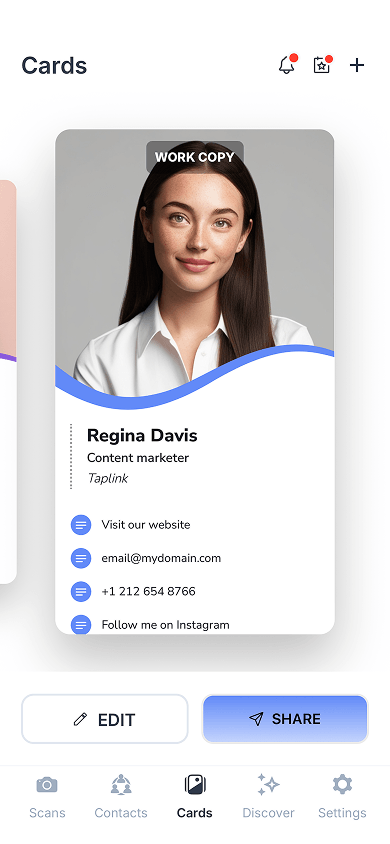
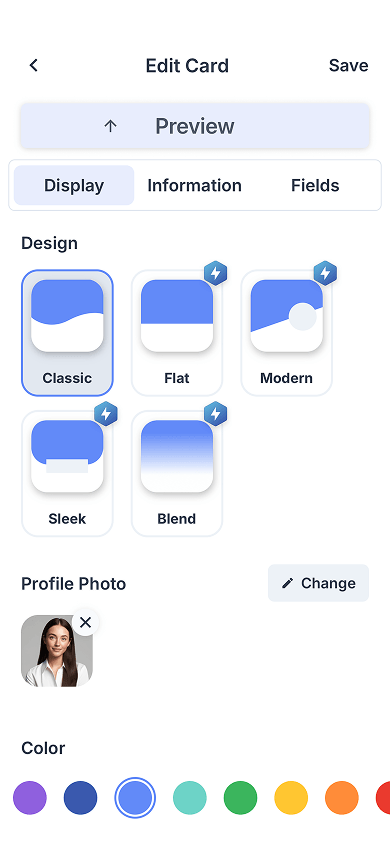

One standout feature is the ability to use a video instead of a profile photo in the header. However, this is only available on the Professional plan and above.
One thing we particularly liked was the flexibility of the lead capture form. You can choose when the form appears, what data to collect, and whether to require agreement with contact-sharing terms.
The analytics and CRM features are fairly basic. However, integrations listed in the table below can extend the platform’s functionality.
| Content options | Personal and company details, email, phone number, links, videos, PDF files, text |
| Customization | 5 header designs, font customization, color customization, lead capture form configuration |
| Built-in analytics | Yes: views, saves, leads, stats export |
| Built-in CRM | Yes: view and edit contacts, add notes and tags, export data |
| Integrations | For CRM and email, including Salesforce, HubSpot, Zapier, Microsoft Exchange |
| NFC devices provided | No |
| Sharing options | QR code, link, email, SMS, Apple Watch/phone widget, NFC device, Apple/Google wallet |
| App available | Yes, for iOS and Android |
| Other important features | Virtual backgrounds, email signature generator |
HiHello works well for professionals and teams that actively network and need simple contact management tools. It strikes a good balance between simplicity and functionality.
- ✅ Quick business card creation.
- ✅ Up to 4 business cards available on the free plan.
- ✅ SOC 2 Type II certified.
- ❌ Slightly outdated card designs.
- ❌ Very few design settings.
For individual users:
- Personal: $0.
- Professional: $6 a month.
For teams:
- Business: $5/month per user.
- Enterprise: Individual pricing.
Wave Connect is a digital business card maker built around in-person networking and NFC. It actively promotes NFC cards, wristbands, and phone stickers, both individually and in bundles.
While Wave Connect’s core feature set is fairly basic, its content options and customization features are stronger than those of many competitors.
Section of the Wave Connect homepage

The interface feels simple and straightforward, without extra menus or distractions.
We tested the free plan and found it more feature-rich than many competing free plans. In addition to contact information and links, you can add images, videos, a map, files, and a Calendly widget. This gives you enough flexibility to showcase your company, accept bookings, and share documents.
A digital business card preview, content blocks, and card design settings in Wave Connect
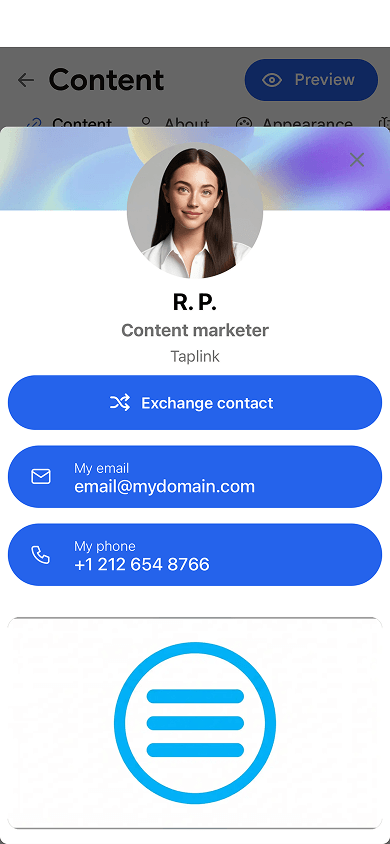
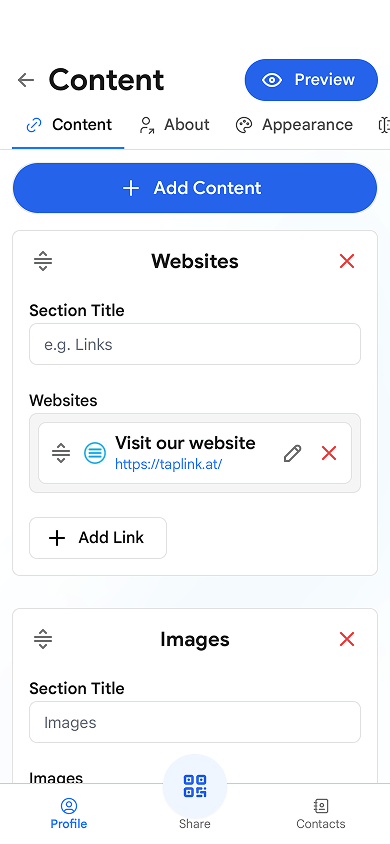

However, the design options are a mixed bag. The free plan offers no customization at all. As a result, free cards tend to look similar to one another. Only the paid plan unlocks more options, and they are rather good. You can change header layouts, text colors, button colors, and button styles.
You can also customize the lead capture form by enabling or disabling it, editing fields, and adding a disclaimer.
| Content options | Personal and company details, email, phone number, text, images, links, Google Map, videos, files, Calendly widget |
| Customization | 3 header layouts, font customization, text color customization, button colors and styles, lead capture form configuration |
| Built-in analytics | Yes: views, clicks, leads, conversion rate |
| Built-in CRM | Yes: view and edit contacts, add tags, export data, set up follow-up emails or SMS messages after capturing a lead |
| Integrations | For CRM, SSO, email, including Salesforce, HubSpot, Zapier, Calendly, Google Workspace |
| NFC devices provided | Yes |
| Sharing options | QR code, link, email, SMS, Apple Watch/iPhone widget, NFC device, Apple/Google wallet |
| App available | Yes, for iOS and Android |
| Other important features | Email signature generator |
Wave Connect is a good fit for individuals who want a free digital business card app with rich content options. However, design customization requires a paid plan. It’s also a strong option for teams thanks to its competitive pricing and broad feature set.
- ✅ Many features on the free plan.
- ✅ Simple interface.
- ✅ Custom domain support.
- ✅ SOC 2 Type II certified.
- ❌ Free-plan cards all use the same design.
- ❌ No Android widget.
For individual users:
- Free: $0.
- Pro: $7 a month.
For teams:
- Teams: $5/month per user.
- Enterprise: Individual pricing.
Mobilo is an online and NFC business card app focused on lead generation and follow-up automation. Unlike most digital business card apps, Mobilo feels more like a lightweight CRM. After getting contact information, you can enrich lead data, send it to a third-party CRM, and trigger automated follow-ups.
Section of the Mobilo homepage

Mobilo doesn’t stand out for its content options or design. Thanks to its simplicity and ease of use, we created a business card in 3 minutes.
The content options are standard and include contact details, links, images, videos, and company information.
Design customization is minimal and focuses on colors, buttons, and a few layout options.
Dashboard, digital business card analytics, and a CRM in Mobilo
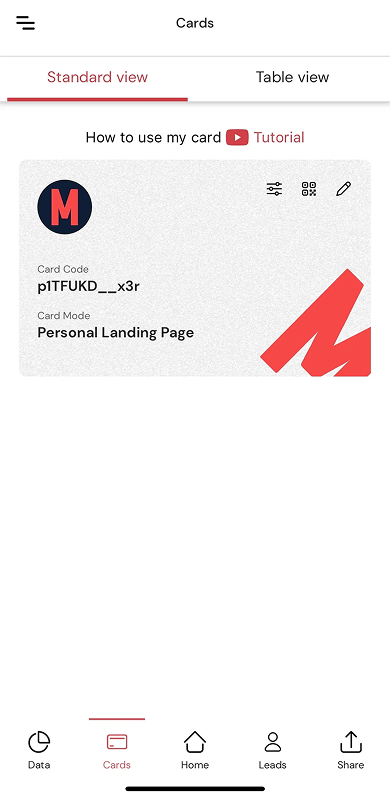
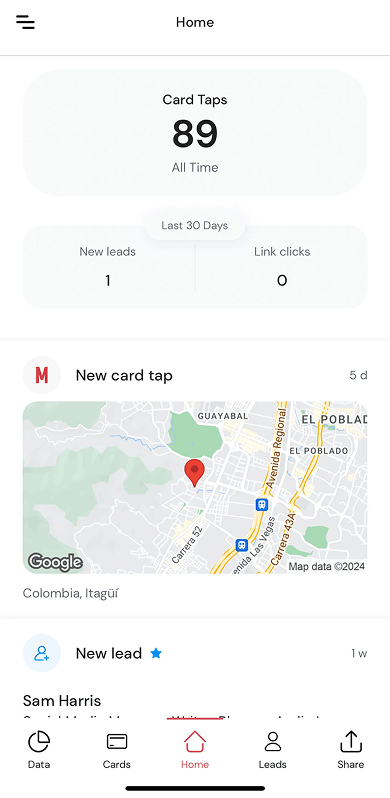

What really caught our attention was Mobilo’s four card modes, which none of the other tools on this list offer:
- Business card: A digital version of a traditional paper business card. Once opened, recipients can instantly save your contact details to their device. The first screenshot shows exactly this card mode.
- Personal landing page: A standard digital business card with a header, contact information, links, and media.
- Lead generation: Instead of a digital business card, your card recipients see a lead capture form.
- Link to URL: Scanning, tapping, or opening the card link redirects people to a predefined URL. You can direct them, for example, to your company website or a product landing page.
We probably wouldn’t use all of these modes ourselves, but they can be useful for business owners or sales managers.
Another feature that helps Mobilo stand out is its follow-up automation. You can set up automatic emails and text messages to your leads, sync leads with your CRM, and trigger automated workflows through integrations such as Mailchimp.
| Content options | Personal and company details, email, phone number, links, images, videos |
| Customization | Header layouts; customization of button styles, background, button, and text colors |
| Built-in analytics | Yes: views, clicks, leads |
| Built-in CRM | Yes: view and edit contacts, add notes and tags, set up follow-ups such as sending a message to a lead or transferring a lead to a CRM |
| Integrations | For CRM, email, booking, including Salesforce, HubSpot, Zapier, Mailchimp, Calendly, Slack |
| NFC devices provided | Yes |
| Sharing options | QR code, link, NFC device, Apple/Google wallet |
| App available | Yes, for iOS and Android |
| Other important features | Custom domain support |
Mobilo is best suited for sales teams and companies that regularly attend conferences, meetings, and events and want to not only exchange contacts but also manage them.
- ✅ Many features for lead management.
- ✅ You can connect a custom domain to your business card.
- ✅ Four card modes support different use cases.
- ✅ SOC 2 Type II certified.
- ❌ No free plan.
- ❌ Limited customization and branding options.
For individual users:
- Pro: $3 a month.
For teams:
- Teams: $4/month per user.
- Business: $5/month per user.
Popl began as an NFC card and tap-to-share accessory brand but has evolved into a B2B platform focused on sales, events, and CRM integrations. Digital business cards are just one part of the Popl ecosystem.
Popl focuses on more than just contact sharing. It also includes lead management tools such as lead collection features, CRM synchronization, AI-powered data enrichment, and others.
Section of the Popl homepage

The card builder itself is extremely simple. You simply add your information and configure buttons. And that’s it.
Content options are limited to the essentials: personal and company information, contact details, and links. There’s no support for images, videos, or other content.
Dashboard, business card editor, and AI contact data enrichment feature in Popl
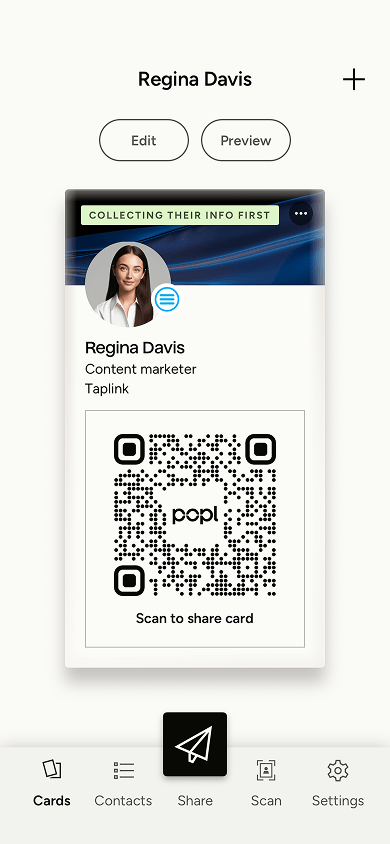
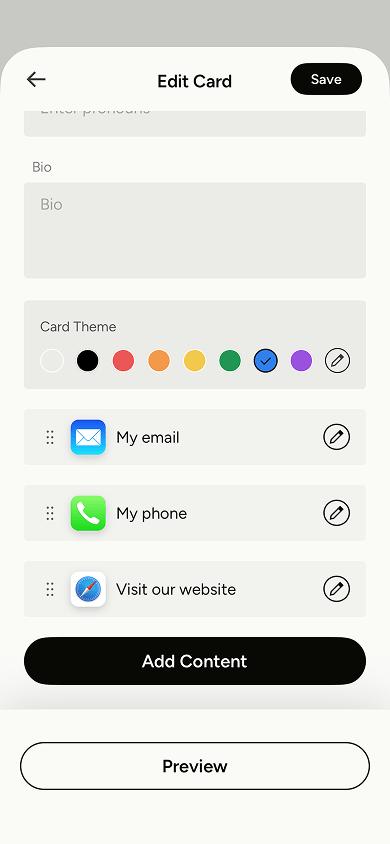

The design isn’t particularly impressive. It feels somewhat outdated compared to most competitors. The first screenshot above shows what a Popl card may look like.
However, Popl makes up for this with its lead generation features. You can customize the lead capture form separately, including the heading, disclaimer, button, and fields. The QR code is also customizable: you can change its color and add your company logo.
Popl also offers AI-powered lead enrichment tools. Once a lead is added to the CRM, AI can enrich the contact record using publicly available information. You can see it in the third screenshot. You can also organize leads using notes and tags.
Popl’s biggest drawback is how limited the free plan is. It only shows the last five leads. In practice, you can use it only to share your contact information or test the built-in CRM. As a result, the free plan isn’t practical for ongoing lead collection and management. At a typical event, you’ll likely collect far more than five contacts. To access all the leads, you’ll need to upgrade to a paid plan.
| Content options | Personal and company details, email, phone number, links, text |
| Customization | Header layouts, background and icon color customization, font selection, lead capture form settings |
| Built-in analytics | Yes: views, saves, and leads |
| Built-in CRM | Yes: view and edit contacts, add notes and tags, export data, enrich contact data using built-in AI |
| Integrations | For CRM, booking, email, SAML, including Salesforce, HubSpot, Zapier, Calendly, Outlook, Azure SAML |
| NFC devices provided | Yes, but not directly. Popl sells them through its Amazon store. Shipping is available only within the United States. |
| Sharing options | QR code, link, email, SMS, Apple Watch/phone widget, NFC device, Apple/Google wallet |
| App available | Yes, for iOS and Android |
| Other important features | Virtual backgrounds, email signature generator |
Popl makes the most sense on its paid plans. For teams, it can be a cost-effective choice since its business plan is cheaper than many competing options.
- ✅ Low per-user cost on the team plan.
- ✅ Many lead management tools.
- ✅ SOC 2 Type II certified.
- ❌ Outdated digital business card design.
- ❌ The free plan is too limited for practical use.
For individual users:
- Free: $0.
- Pro: $6.42 a month.
- Pro+: $11.99 a month.
For teams:
- Digital Business Cards: $4/month per user.
- Event Lead Capture: Individual price.
Uniqode is a QR code and online business card platform built for teams and businesses. It originally focused on dynamic QR codes for companies, and the card builder was introduced later as one of the platform’s offerings.
The platform’s main strength is its built-in analytics. While they’re not exceptionally detailed, they provide more insight than most competitors on this list.
Section of the Uniqode homepage

As mentioned earlier, analytics are where Uniqode stands out the most. You can track views by device and by location down to the city level. Uniqode also shows saves, leads, and unique visitors.
However, we immediately noticed a major limitation. The mobile app includes only basic metrics such as total views, saves, and leads. To access device and location data, we had to use the web version. Having to switch to the web app whenever you want deeper insights is a bit inconvenient.
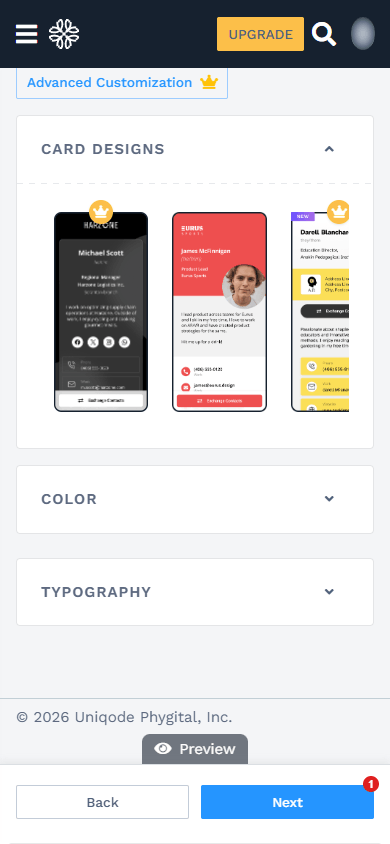
Content blocks, card design settings, and analytics in Uniqode
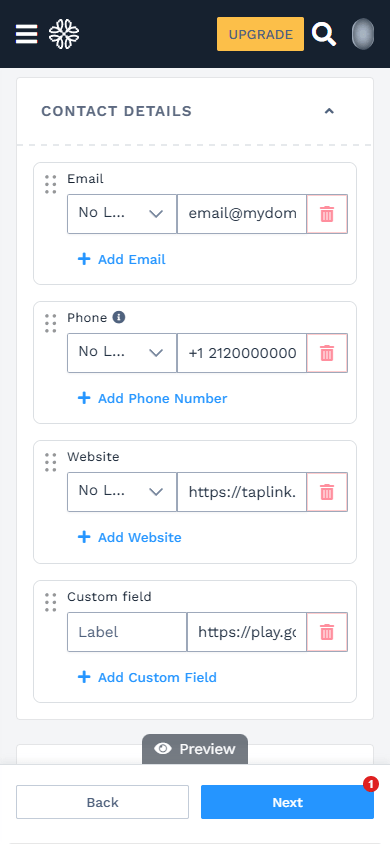

The content options are basic. They include information about you and your company, contact details, links, and text.
One pleasant surprise was the card layouts. Unlike many competitors, each layout changes the design and structure of the entire card rather than just the header.
You can also customize the QR code that is automatically generated for the card. You can change its colors and shape and add a logo. However, advanced QR code customization, its analytics, and password protection are only available when you purchase a QR code separately.
The free plan has the same limitation as Popl’s: only five leads can be stored. Because of that, the free plan is best suited for testing the platform or sharing contacts only. It’s unlikely to be enough for collecting and managing lead data.
| Content options | Personal and company details, email, phone number, website link, text |
| Customization | 12 layouts, text and element color customization, font customization |
| Built-in analytics | Yes: views, visitor devices and locations, unique visitors, saves, leads, analytics export |
| Built-in CRM | Yes: view and edit contacts, add notes, export data, enrich contact data using built-in AI |
| Integrations | For CRM, email, analytics, including Google Analytics, Outlook, Zapier, HubSpot, Meta Pixel |
| NFC devices provided | No |
| Sharing options | QR code, link, email, NFC device, Apple/Google wallet |
| App available | Yes, for iOS and Android |
| Other important features | Multi-language business cards, custom domain support, virtual backgrounds, email signature generator |
Since Uniqode can automatically translate business cards into other languages, it’s a strong app for people who work internationally. The built-in analytics can also show where most of your traffic comes from.
- ✅ You can connect a custom domain to your business card.
- ✅ Translates business cards into multiple languages.
- ✅ Clean and easy-to-understand interface.
- ❌ The free plan is too limited for practical use.
- ❌ Detailed analytics are only available in the web version.
For individual users:
- Free: $0.
For teams:
- Team: $6/month per user.
- Business+: Individual price.
V1ce is a platform for NFC and electronic business cards that focuses on premium in-person networking, lead generation, and follow-up automation. It originally sold NFC cards made from metal, bamboo, and other materials, and then expanded into a full networking platform.
Section of the V1ce homepage

V1ce positions itself as an advanced alternative to Linktree: instead of a simple page with links, it lets users create more complex business cards with media content and lead capture forms.
Creating a business card took us about 10 minutes — longer than with most other tools. However, that’s simply because V1ce offers a lot of features.
When it comes to content options, V1ce felt a lot like Taplink, which we covered above. You can also add a lot of blocks here, including photos, videos, testimonials, files, text, a map, and even services that people can buy right from your business card.
As a result, the card feels more like a personal landing page than a simple contact-sharing tool. After meeting you, people may not immediately remember who you are or what you do. A business card like this can quickly remind them and provide additional context about your work.
Digital business card preview, design themes, and content blocks in V1ce
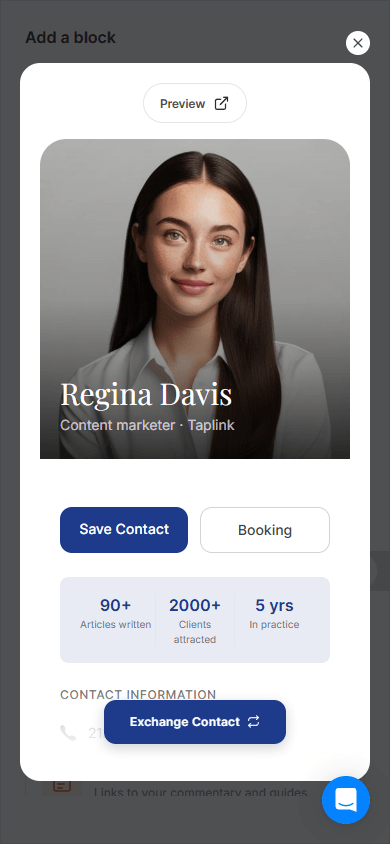
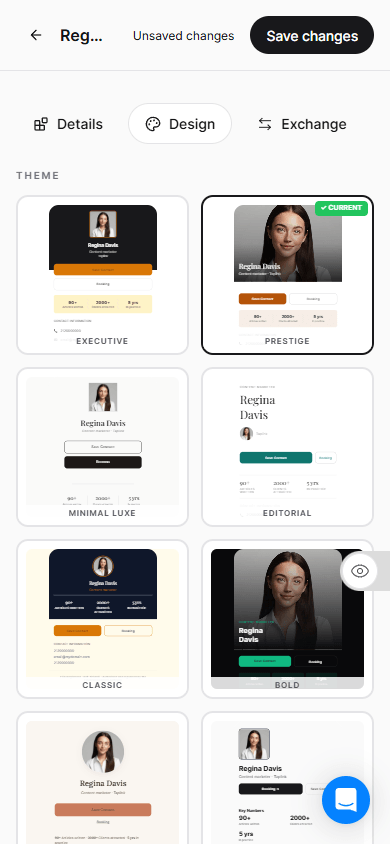

The templates are also visually polished. There are only nine templates, but each one feels distinct and professionally designed. You can see them in the second screenshot.
Other interesting features include Smart Follow-Ups and Scout. The first feature helps automate email follow-up sequences after someone provides their contact data. And Scout is an AI tool that gathers publicly available information about people you’re planning to meet. Both features are available on paid plans only.
| Content options | Personal and company details, email, phone number, links, text, testimonials, videos, images, FAQ, files, a map, services that people can purchase directly from the card |
| Customization | 9 card layouts, font selection, element color customization, light and dark themes, button corner radius settings, lead capture form customization |
| Built-in analytics | Yes: views, clicks, leads, revenue, bookings, follow-ups |
| Built-in CRM | Yes: view and edit contacts, manage statuses, add notes and reminders, set up follow-up emails |
| Integrations | For CRM and booking, including HubSpot, Zoho, Salesforce, Zapier, Google Calendar, Outlook |
| NFC devices provided | Yes |
| Sharing options | QR code, link, email, SMS, NFC device, Apple/Google wallet |
| App available | Yes, for iOS and Android |
| Other important features | Scout AI for researching people before meetings, custom domain support, virtual backgrounds, email signature generator |
V1ce is a good fit for users looking for a more advanced online business card with rich content, service sales, and email automation features. If you only need a simple contact card, the interface and feature set may feel excessive.
- ✅ Includes a 30-day free trial.
- ✅ Many features on the free plan.
- ✅ You can connect a custom domain to your business card.
- ❌ The interface and feature set may take time to learn.
- ❌ The team plan may be costly for small teams.
For individual users:
- Free Forever: $0.
- Smart Card: From $100 one-time.
For teams:
- ClientCapture OS: $66 a month, regardless of the number of business cards created.
Tapni is a platform for virtual business cards and NFC products, including NFC cards and NFC phone stickers. It focuses on simplicity while offering basic tools for networking and lead management.
Section of the Tapni homepage

The platform’s biggest strength is its clean interface and quick setup process. It also includes a built-in CRM and integrations for managing leads.
Tapni is one of the best digital business card apps for anyone looking for an extremely easy-to-use platform. It even felt more like a link in bio tool than a traditional business card app.
Most of the available content blocks are links. You can add links to social media profiles, messaging apps, payment services, and music platforms. The free plan officially supports up to 10 links, although we managed to add 20 links through the browser version.
Profile fields are limited to your name and a short bio. There is no dedicated field for company information, so you’ll need to include both personal and company details in that bio.
Dashboard, content blocks, and business card templates in Tapni
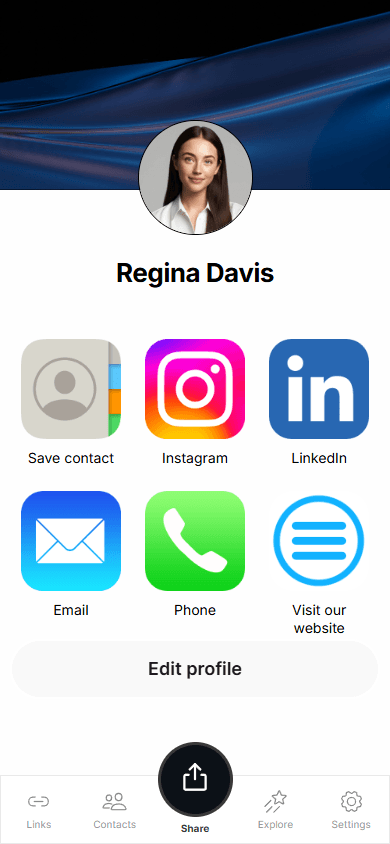
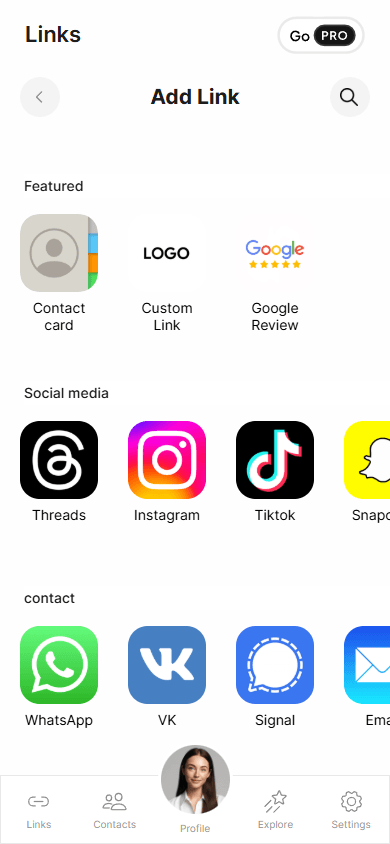

However, Tapni remains competitive when it comes to CRM features, analytics, and integrations. It offers basic built-in analytics, allows you to manage leads and set reminders within the built-in CRM, and connect integrations for analytics, lead management, and synchronization.
Like Mobilo, Tapni lets you redirect visitors to any URL instead of displaying your business card. For example, when a person scans the QR code or follows the card link, they are redirected to your website or social media profile.
| Content options | Personal details, email, phone number, links |
| Customization | 9 design themes |
| Built-in analytics | Yes: views, clicks, visitor location, conversion rate |
| Built-in CRM | Yes: view and edit contacts, add reminders, save contacts to your device one at a time |
| Integrations | For CRM, AD & SSO, analytics, including HubSpot, Salesforce, Google Workspace, Slack, Google Analytics, Meta Pixel |
| NFC devices provided | Yes |
| Sharing options | QR code, link, phone widget, NFC device, Apple/Google wallet |
| App available | Yes, for iOS and Android |
| Other important features | Includes a free custom domain for one year, virtual backgrounds, email signature generator |
Tapni works best for individual users who want a very simple online business card without complex content or design options. We’d recommend Tapni to individual users on both the free and paid plans. For teams and businesses, however, the platform feels less competitive. Pricing is similar to other tools, but the feature set is more limited.
- ✅ Extremely simple and quick business card creation.
- ✅ Free custom domain for one year on the Pro plan and up.
- ✅ Free NFC card on the Business plan and up.
- ❌ Content options are limited to contact details and links.
- ❌ No dedicated fields for information about your expertise or company.
For individual users:
- Free: $0.
For teams:
- Business: $4.99/month per user.
- Enterprise: from $49.99 a year.
Dot is a digital business card and NFC app designed for networking. It’s a simpler, more modern alternative to enterprise-focused platforms like Popl and Mobilo.
Section of the Dot homepage

Dot was one of the easiest digital business card makers we tested. We created our card in just 5 minutes.
The available content options are standard and include personal and company information, contact details, and links. As an extra, you can also add a text block and a file that people can download directly from your card.
Digital business card preview, content blocks, and card design settings in Dot
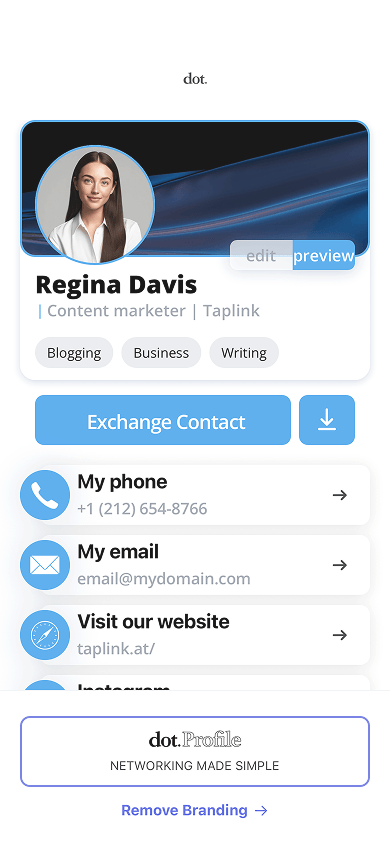
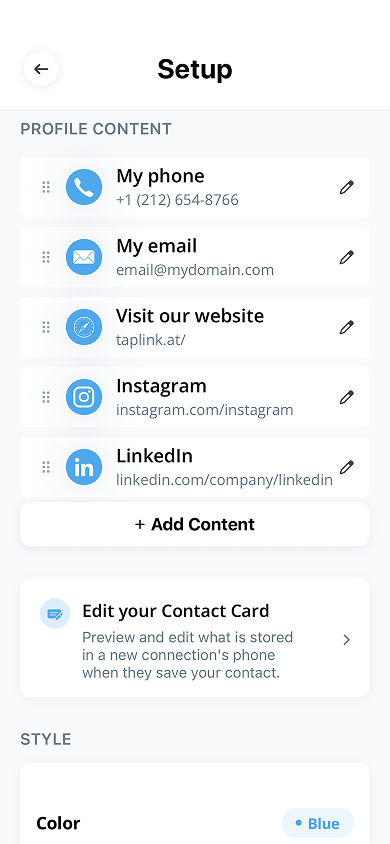

Design customization is limited as well. You can change colors, customize icon styles, and switch between light and dark themes.
The most useful features are locked behind the paid plans, which feel very expensive compared to competitors. With a paid plan, you can customize QR code colors, tag leads, and access 6 card themes instead of 3.
Another useful paid feature is a dashboard map showing where each contact was collected. This makes it easier to remember where you met each contact and who they are.
| Content options | Personal and company details, email, phone number, links, a file, text |
| Customization | 6 themes, icon color customization, link style selection |
| Built-in analytics | Yes: views, clicks, saves, leads |
| Built-in CRM | Yes: view and edit contacts; add notes, tags, and reminders; access a map showing your contact locations; save contacts to your device one at a time |
| Integrations | For CRM and analytics, including Zapier and Google Analytics |
| NFC devices provided | Yes |
| Sharing options | QR code, link, NFC device, Apple/Google wallet |
| App available | Yes, for iOS |
We’d recommend Dot’s free plan to anyone looking for a simple, modern digital business card. The paid plans don’t provide enough value for the price, especially considering that they cost significantly more than the market average.
- ✅ Simple and quick business card creation.
- ✅ Includes a free 7-day trial for the dot.Profile+ plan.
- ❌ The paid plans don’t offer enough value for their price.
- ❌ Most useful features are only available on team plans.
For individual users:
- dot.Profile: $0.
- dot.Profile+: $12 a month.
For teams of up to 100 members:
- Essential: $8/month per user.
- Growth: $15/month per user.
For teams of more than 100 members:
- Essential: Individual pricing.
- Growth: Individual pricing.
Haystack is primarily designed for companies and teams. The platform focuses on centralized card management, security, compliance, and scaling digital business cards across organizations.
Section of the Haystack homepage

The first thing we noticed was how limited the web version is. You can hardly do anything there: you can’t create a card or edit an existing one. You can only view cards and share them. So, we had to download the mobile app to create a card.
The mobile app itself is simple and easy to use. Creating a card takes just about 5 minutes.
Like Taplink, Haystack allows unlimited business cards even on its free plan. That’s useful for anyone who needs multiple cards for different purposes. For example, you can create separate cards for multiple projects, business lines, brands, or company roles.
Dashboard, card editor, and content blocks in Haystack
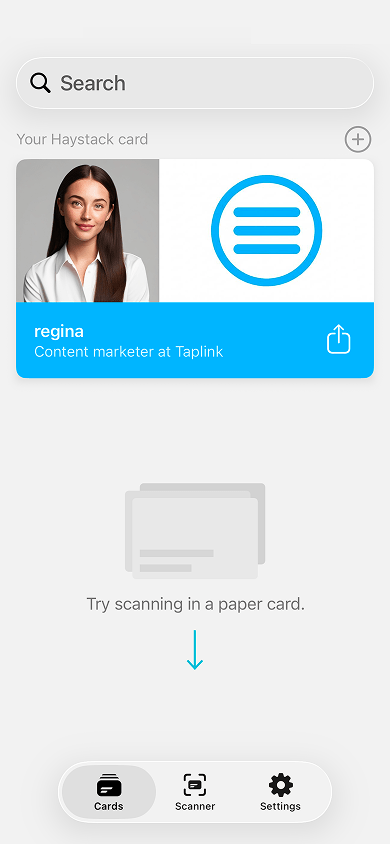
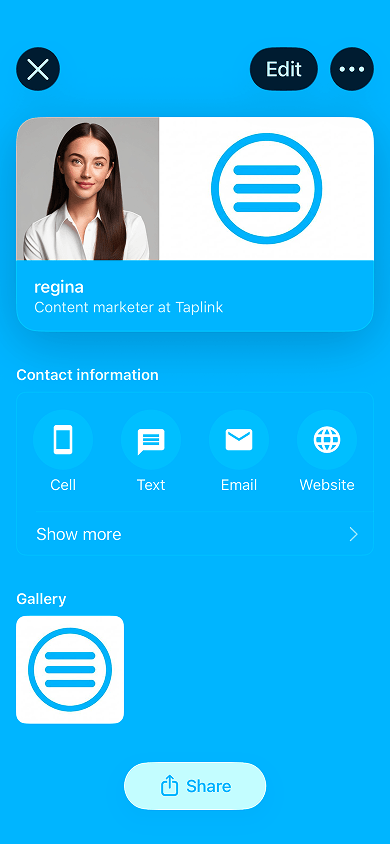

The free plan is more restrictive than most competing free plans. You can only add links to a website, Google Maps, Facebook, X, LinkedIn, and Skype. To add Instagram, TikTok, YouTube, calendar links, or anything else, you’ll need at least the Pro plan.
The same is true for design customization. The free plan doesn’t allow any design changes. However, if you sign up with a company email, Haystack may automatically apply your company’s branding colors based on the email domain. In our case, the card automatically picked up a blue color scheme. If you use a personal email address or if Haystack can’t identify your company colors, the card remains white. Manual color customization is available only on paid plans.
| Content options | Personal and company details, email, phone number, links, a file, images, a video |
| Customization | Themes, customization of card colors, name, job title, background, icons |
| Built-in analytics | Yes: views, clicks, saves |
| Built-in CRM | No |
| Integrations | For CRM and email, including Outlook, Google Workspace, Microsoft Entra ID, HubSpot, Zoho, Zapier, Mailchimp |
| NFC devices provided | No |
| Sharing options | QR code, link, email, SMS, phone widget, NFC device |
| App available | Yes, for iOS and Android |
| Other important features | Email signature generator |
Haystack is most compelling on its paid plans. The free plan is too limited. The platform is a good fit for users who want clean, professional-looking electronic business cards and a simple user experience.
- ✅ Quick and easy business card creation.
- ✅ Unlimited cards on every plan, including the free plan.
- ✅ SOC 2 Type II certified.
- ❌ The web version doesn’t allow card creation or editing.
- ❌ The free plan is too limited.
For individual users:
- Personal: $0.
For teams:
- Pro: $4.5/month per user for teams of 2 to 10 members.
- Business: $2.5/month per user for teams of 10 to 250 members.
- Enterprise: Individual price for teams of more than 250 members.
Kado is a digital business card app aimed primarily at teams and sales professionals. Unlike many digital business card makers, Kado focuses less on card design and more on lead management within the platform itself.
Section of the Kado homepage

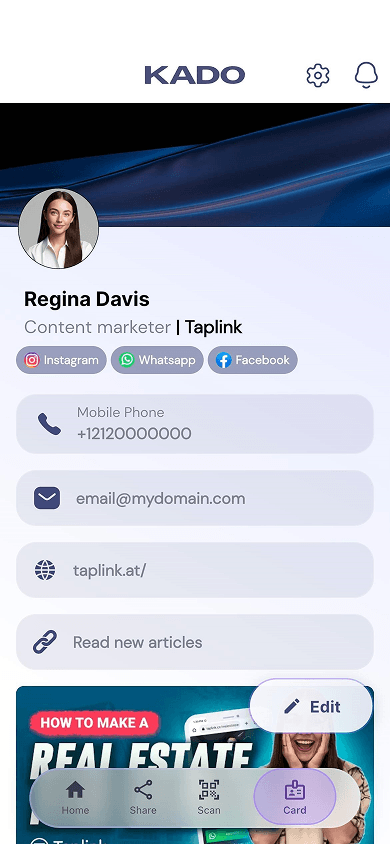
Kado’s content options are more robust than they first appear. You can add numerous links to third-party platforms and embed multiple videos directly on your business card page. It supports a wide range of link types, including video, payment, and music platforms, as well as messaging apps.
The design settings, however, are minimal. You can choose between two header layouts and customize the colors of the background, text, and buttons.
Dashboard, card design settings, and a CRM in Kado
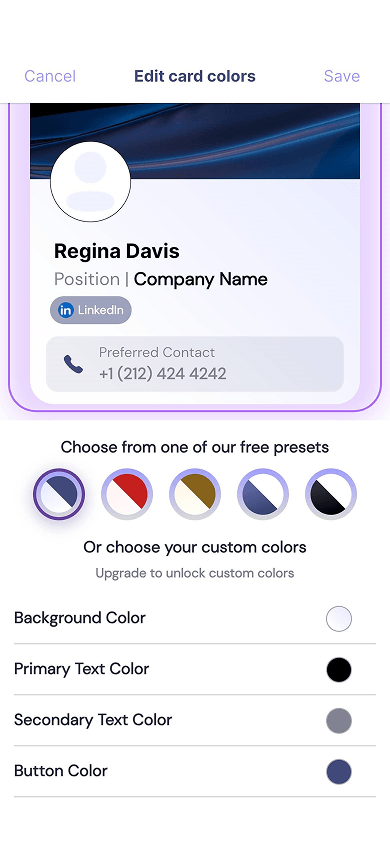

CRM functionality is where Kado shines. The platform allows you to:
- Edit leads.
- Add notes to leads.
- Segment leads using tags.
- Set reminders for leads.
- Create rules for automatic lead grouping.
As a result, Kado feels more like a lightweight CRM than a traditional digital business card app.
| Content options | Personal and company details, email, phone number, links, a video |
| Customization | 2 layouts; background, text, and icon color customization |
| Built-in analytics | Yes: views, clicks, leads, conversion rate |
| Built-in CRM | Yes: view and edit contacts; add notes, reminders, and tags; create segmentation rules, export data |
| Integrations | For CRM, including HubSpot, Salesforce, Zapier, Dynamics Sales |
| NFC devices provided | Yes |
| Sharing options | QR code, link, phone widget, NFC device, Apple/Google wallet |
| App available | Yes, for iOS and Android |
Kado works well for people who regularly collect leads and want to manage them without using a separate CRM.
- ✅ Strong lead management functionality.
- ✅ Low-cost paid plans.
- ❌ Integrations are limited to CRM tools only.
- ❌ New users may need some time to learn the interface.
For individual users:
- Free: $0.
For teams:
- Networker: $2.5/month per user.
- Business Developer: $4/month per user.
- Enterprise: Individual price.
No single digital business card app is the best fit for every use case. Some tools are best for simply exchanging contact information, while others focus on showcasing your business or managing leads.
If you’re still unsure which option to choose, take a look at the comparison table at the top of this article. It summarizes the main use cases, key features, and pricing of each platform.
If you simply want to know which digital business card apps we consider the top ones, here are our top picks:
- Taplink: Best digital business card app for those who want a fully branded card that doubles as a business presentation page.
- Mobilo: Best digital business card app for sales professionals and teams that actively collect leads and need tools to manage them.
- Uniqode: Best digital business card app for people who work internationally and want detailed traffic analytics.
The best digital business card app depends on your needs:
- Exchanging contact data only: Blinq, Tapni, Dot, Haystack.
- Lead management: HiHello, Wave Connect, Mobilo, Popl, Kado, V1ce.
- Personal branding and business presentation: Taplink, V1ce, Wave Connect.
- Individual use: Taplink, Blinq, HiHello, Wave Connect, Uniqode, Tapni, Dot, Haystack, Kado.
- Corporate and team use: Taplink, HiHello, Wave Connect, Mobilo, Popl, Uniqode, Haystack, Kado.
Many digital business card apps offer free plans. However, keep in mind that free plans include only basic features. The following platforms offer free plans:
- Taplink.
- Blinq.
- HiHello.
- Wave Connect.
- Popl.
- Uniqode.
- V1ce.
- Tapni.
- Dot.
- Haystack.
- Kado.
To learn more about these tools and the features available on their free plans, read our full review of the best digital business card apps.
Start by choosing a tool that fits your needs. To compare your options, check out the best digital business card apps overview. The setup process varies depending on the platform you choose. We’ll use Taplink as an example. It allows you to create a digital business card using either a ready-made template or AI.
To create a digital business card from a template:
- Sign up for Taplink.
- Choose a template.
- Generate business card copy with AI or edit the pre-made text manually.
- Customize the design, if needed.
- Publish your business card.
To create a digital business card with AI:
- Sign up for Taplink.
- Open the AI builder and describe your business and what you do.
- Choose the sections you want to include on your card, select a color scheme, and edit the generated text, if needed.
- Add images and set actions for buttons.
- Customize the design, if needed.
- Publish your business card.
For a detailed step-by-step walkthrough, read our complete guide to creating a digital business card in Taplink.
It depends on the platform, but most digital business card apps include security measures such as:
- Data encryption during transmission.
- Storage on secure servers.
- Access management features, including team roles and permissions.
- Two-factor authentication for access to your account.
Many platforms also comply with GDPR, which sets rules for how companies collect, store, and process user data.
No. Updating your digital business card doesn’t change its QR code or link. People can continue using the same QR code and URL, which will always direct them to the latest version of your card.
No. In most cases, an NFC device simply points to your digital business card through a link. Since that link remains the same when you update your content or design, there’s no need to replace the NFC device.
Yes. Digital business card apps let you collect contact information through built-in lead capture forms. Depending on the platform, visitors can submit details such as their name, job title, phone number, email address, and a message. Many platforms let you customize these forms by choosing which fields to include. Examples include Taplink, HiHello, Wave Connect, Popl, and V1ce. Many digital business card apps also include a built-in CRM for managing collected contacts. These include Taplink, Blinq, HiHello, Wave Connect, Mobilo, Popl, and others.
Yes, but only with certain platforms:
- Taplink: Lets you sell digital products directly from your business card. Taplink doesn’t charge transaction fees and supports up to 60 payment providers.
- Wave Connect: Lets you embed a Calendly widget for service bookings, but it doesn’t include built-in payment processing.
- V1ce: Lets you list services and accept payments through Stripe.