What is a digital business card? Types, benefits, and how it works

- What is a digital business card?
- What does a digital business card look like?
- How do digital business cards work?
- Ways to share a digital business card
- Link
- QR code
- NFC
- Apple Wallet or Google Wallet
- How do people save contact details?
- What can you include on a digital business card?
- Digital business card benefits
- Digital vs. paper business cards
- Who uses digital business cards?
- How much does a digital business card cost?
- How to create a digital business card
- What Taplink offers
- How to create a digital business card in Taplink
- FAQ
- Can a digital business card replace a paper business card?
- Does a digital business card need an internet connection?
- Does an NFC business card need a separate digital card?
- Can I update a digital business card after sharing it?
- Can I create separate digital business cards for employees?
- Can people save my contact details from a digital business card?
- Are digital business cards safe?
- Can I create a digital business card for free?
- Can I sell products or services from a digital business card?
- Can I use a digital business card in an email signature?
A digital business card is an electronic alternative to a paper business card. It stores your contact information and other professional details online.
Unlike a paper card, a digital business card is usually a web page. You can open it from a smartphone, tablet, or computer.
You might also see these terms:
- Virtual business card.
- Electronic business card.
- E-business card.
- Online business card.
- Digital visiting card.
- E-visiting card.
- Smart business card.
These terms can describe similar products. However, individual services may use them for different features.
You create the card with a digital business card maker, website builder, or app. The service hosts the page and gives you a link to your business card page.
You can then share this link directly or use another method, such as a QR code or NFC device.
Unlike a paper card, you can update the digital version without having to print it again. The recipient can also save your contact details to their phone.
Digital business cards work for individuals and teams. Sales professionals, real estate agents, freelancers, consultants, and small businesses can use them.
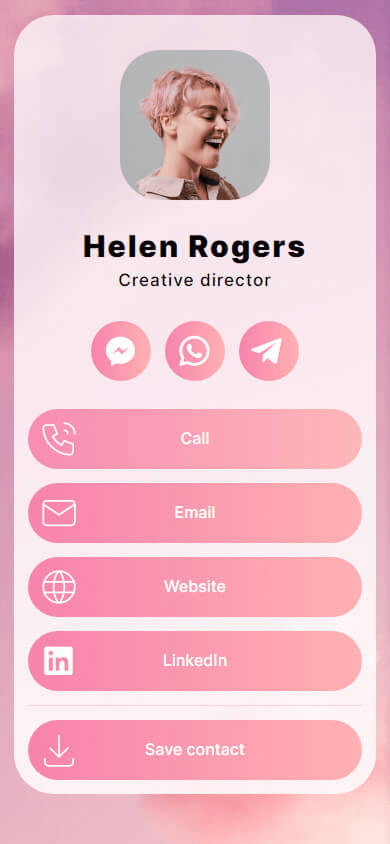
A digital business card typically resembles a mobile-friendly profile page. Its layout depends on the platform and your purpose.
A simple card may contain your:
- Name and job title.
- Photo or company logo.
- Phone number.
- Email address.
- Website link.
- Social media links.
- Save-contact button.

More advanced cards can work like small business pages. They can show services, portfolios, testimonials, videos, booking links, and forms.
Here’s an advanced digital business card example. To make it easier to view, it’s split across three screenshots.



You can build an advanced digital business card with Taplink. We’ll cover this tool below.
The content can also depend on your profession. A salesperson may focus on contact details and booking. A photographer may highlight a portfolio. A consultant may show services and testimonials.
Some digital business cards, including Taplink, also support payments and product sales. This turns the card into more than a contact page.
Most web-based digital business cards follow the same basic process.
- Create the card: Add your contact information, business details, and design.
- Publish the card: The platform creates a web page with a unique link.
- Share the card: Send the link or use a QR code, NFC device, or another method.
The digital card remains on the platform after you share it. When you update the page, future visitors see the new information.
The same digital business card can support several sharing methods. You don’t need a separate card for each method.
A direct link opens the card in a web browser. You can send it through text messages, email, social media, messaging apps, or put it in your social media bio.

This method works well for remote networking. You can send the same card to someone in another city or country.
A QR code contains the link to your digital business card. The recipient scans it with a phone camera and opens the page.

You can display the code on your phone or print it on physical materials. For example, you can place it on:
- Paper business cards.
- Product packaging.
- Event stands.
- Flyers.
- Posters.
- Receipts.
- Signs.
NFC provides another way to open a digital business card. An NFC device contains a chip or tag that can store or redirect to the card’s link.

The recipient taps a compatible smartphone against the device. The phone then opens the digital card.
NFC doesn’t replace the digital profile. It provides another way to access the same page.
Some NFC business cards can also include a QR code. This gives recipients another option when NFC doesn’t work.
Some digital business card services let you save a card to Apple Wallet or Google Wallet. The card remains available in the mobile wallet. You can access it without opening the provider’s website first.

Wallet support varies between providers. Check which wallets the service supports before choosing a platform.
Opening a digital business card doesn’t automatically save the information to the recipient’s contacts.
Digital card makers provide a save-contact button. It can generate or download a vCard with the contact information.
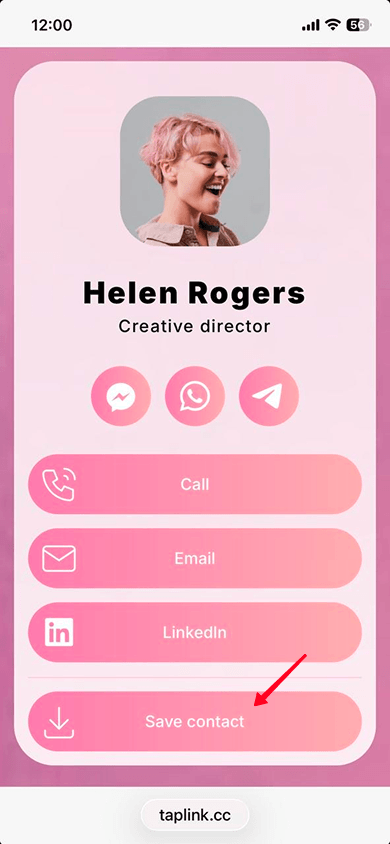

A vCard is a digital contact file. It commonly uses the .vcf format. The recipient can open the file and add the information to their phone’s contacts.
This works differently from viewing the web page. The web page displays your information, while the vCard transfers contact fields to a contact application.
Start with the information people need to contact you. Consider adding your:
- Your photo.
- Your name and area of expertise.
- Contact details: phone number, email, and social media links.
- A button to save a contact.
- Your services and/or products, with descriptions and prices if needed.
- A contact form or a form for inquiries/orders.
- A map with your location, if needed.
You can see an example of a card with all the essential information below.
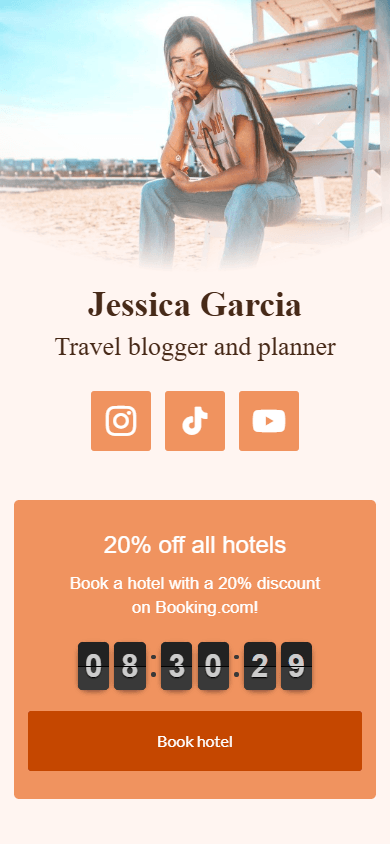
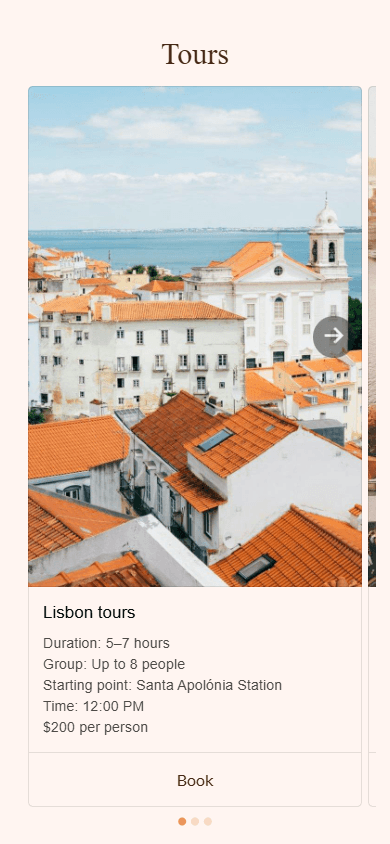

These are the core elements to include on your digital business card. Depending on your goals, you can remove or add something more, including videos, music, an FAQ section, or testimonials.
Digital business cards offer several advantages over paper cards, including:
- Easy updates: You can change your phone number, email, services, or other details without printing new cards.
- Multiple sharing options: You can share the same card through a link, QR code, NFC device, or other supported methods.
- More information: A digital page has room for services, portfolios, videos, testimonials, and booking links.
- Contact saving: A save-contact button can transfer your information to the recipient’s contacts, without needing to input your details manually.
- Online sharing: You can send your card to people anywhere. It works for remote meetings and online networking.
- Analytics: Many platforms track views, clicks, leads, conversions, and other interactions.
- Lower printing needs: You don’t need to print a new batch every time your information changes.
- Business features: Some platforms support forms, CRM tools, payments, and product sales.
Because of these benefits, people are choosing digital business cards more and more.
Digital and paper cards solve the same basic problem. They help people exchange professional contact information. Their features differ in several areas.
| Feature | Digital business card | Paper business card |
| Updates | Change online | Require reprinting |
| Sharing | Link, QR, NFC, or wallet | Hand-to-hand |
| Contact saving | Often available | Manual entry |
| Multimedia | Images, video, and links | Only images |
| Analytics | Available with many platforms | No |
| Printing | Not required | Required |
| Internet | Often required | Not required |
| Physical format | Optional | Required |
Paper cards still have practical uses. Some people prefer a physical card during face-to-face meetings.
Digital cards are useful when you need frequent updates, online sharing, or interactive content.
Digital business cards work for many types of professionals:
- Sales professionals can share contact details during calls and meetings. They can also add booking and lead forms.
- Real estate agents can show listings on a map or as links, social profiles, contact details, and appointment forms.
- Freelancers can combine their contact information with portfolios and service descriptions.
- Consultants can add services, testimonials, case studies, and booking forms.
- Recruiters can share contact details and links to job or company information.
- Small business owners can add services, locations, reviews, and contact forms.
The cost of a digital business card depends on the platform you create it with. Some offer free digital cards. Others charge a monthly or annual subscription.
NFC cards can also have a separate hardware cost. Wallet passes and advanced analytics may depend on the provider.
Let’s look at pricing using the Taplink digital card maker as an example. Taplink currently has three plans:
- Basic: Free.
- Pro: $4/month.
- Business: $8/month.
Taplink allows you to share your digital business card via a link or a QR code. You can also connect the page to a third-party NFC device. The device opens the same Taplink page as a link or QR code.
Now, it’s time to find out how to create a digital business card.
You can make a digital business card in 5 minutes with Taplink. All the examples in this article were made using it. Taplink lets you set up an advanced business card with your contact info, links, photos, videos, forms, a map, and more.
Taplink combines digital business card features with tools for presenting and promoting your business. Here are the main advantages it offers:
- AI-powered creation: Taplink can generate a complete digital business card from a short description of your business. It creates the page structure and content in about 15 seconds. You can also use AI to generate text for a ready-made template.
- Content beyond contact details: Add services, products, photos, videos, testimonials, and other content to your card. This helps you show what you offer instead of sharing contact details alone. Musicians can also add music to their pages.
- Lead collection: Add a form to collect inquiries, orders, or email addresses. For example, you can offer a free resource in exchange for an email address. You can then use these contacts for email marketing.

- Flexible design: Customize your card with your brand colors and fonts. You can also animate buttons and divide content into sections. If you prefer a ready-made design, Taplink offers more than 200 templates.
- Custom QR codes: Taplink automatically creates a QR code for your published card. You can customize its appearance by changing the code shape, dot shape, and colors.
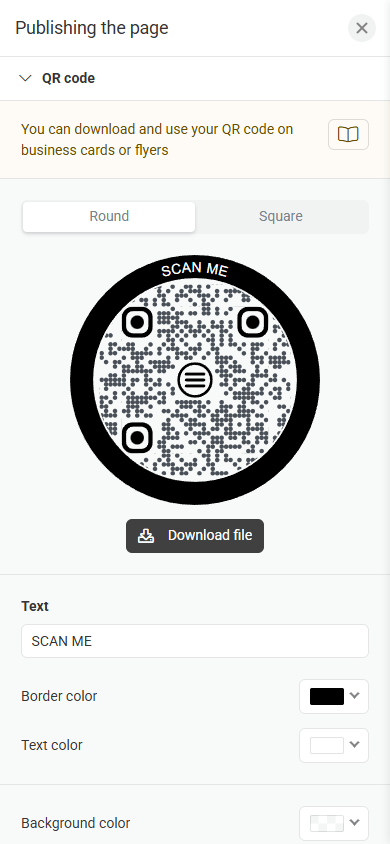

- Analytics and CRM: Taplink provides built-in tools for tracking your card’s performance and managing collected contacts. Depending on the plan, you can track views, clicks, conversions, leads, and revenue.
- Payments and digital products: You can add payment features and sell digital products from the same page. This is useful when your card also needs to promote or sell your products or services.

These features let you turn a digital business card into a complete mobile business page. You can use one page to share your contact details, present your offer, collect leads, and accept payments.
You can create a Taplink digital business card in five steps:
- Sign up for Taplink.
- Choose a template, start from scratch, or use the AI builder.
- Add your contact details and other content.
- Customize the design and page layout.
- Publish your card.
ℹ️ For a detailed walkthrough, see the guide on how to create a digital business card in Taplink.
Yes, it can replace a paper card for many networking situations. A digital card is easier to update and share online. It can also contain more information and interactive features.
However, some people still prefer physical cards. You can use both formats and connect them with a QR code.
Usually, yes. A web-based card needs an internet connection to load its page. The same applies when someone opens the card through a QR code or NFC device. The NFC device itself doesn’t need to contain the card’s full content. It can simply open the card’s link.
No. An NFC device can open the same digital business card that you share through a link or QR code. The NFC chip provides another access method. The digital page still contains the actual business information.
Yes. Digital business cards can be edited after publishing. People who open the same link will see the updated version. This means you can change your phone number, email, services, or other details without creating a new card.
Many platforms support multiple digital cards or pages. You can create separate cards for employees, departments, locations, or business activities. The exact number depends on the platform and plan.
Taplink supports multiple pages, so businesses can create separate pages for different employees or business needs.
Yes. Digital cards include a save-contact button. The button can provide your information as a vCard. The recipient can then add the contact details to their phone.
Digital business cards can be safe when you use a reputable card maker. The main risks involve the information you publish and the security of your account.
Avoid publishing information that doesn’t need to be public. Use a strong password and two-factor authentication when available. Also review the provider’s privacy and security practices before choosing a service.
Yes. Some platforms offer free plans. Free plans usually include basic contact details, links, and QR sharing. Advanced features may require a paid plan.
Taplink has a free Basic plan with contact links, text, a map, reviews, FAQ, design themes, and a QR code.
Some digital business card platforms support sales features. For example, Taplink lets you add digital products to your page. Its Business plan also supports forms and payment features. This lets you use one page for contact information, business presentation, lead collection, and sales.
Yes. You can add the card’s link to your email signature. Recipients can open the page directly from the signature. This gives people access to your current contact information without requiring a new paper card.