Universe website builder shutdown: how to save your site

- What happened to the Universe website builder
- What remains available before the shutdown
- What happens to subscriptions
- How to save your site content
- What Universe users should do now
- Taplink: an alternative to Universe
- FAQ
- What is the Universe website builder?
- When does Universe shut down?
- Can I keep my domain when switching from Universe?
- Can I export my entire Universe website?
- What can I use instead of the Universe website builder?
Universe announced its shutdown in an email to users and on its website.
Here’s what the team shared:
“We plan to wind down the service over the remainder of 2026 and expect to continue operating through December. Your website will stay online and working until December 31, 2026.”
Websites stay online until December 31, 2026. Until that date, users can manage their sites and update their content.
Universe shared plans to limit some features in the weeks after the announcement. Users will no longer be able to create new sites, start subscriptions, or register domains.
Universe will automatically cancel all active subscriptions before December 31, 2026. Users can also cancel earlier through Apple or their Universe subscription settings.
Universe has already launched export tools. They let you download images, videos, and text, and export mailing lists and order histories.
If you registered your domain through Universe, you can transfer it to another registrar.
To prepare for the shutdown, take these three steps:
- Save your content and data: Download your site content using Universe’s export tools.
- Cancel your subscription: Do this through Apple or your Universe settings.
- Switch to another builder: Create a new site before Universe shuts down so you can keep receiving inquiries and making sales. This gives you time to test your site and update your links. Taplink is a great Universe replacement.
Taplink is a website builder for creators, professionals, and small businesses. You can create a portfolio, showcase your services, or sell digital products. Visitors can send inquiries and pay for purchases.

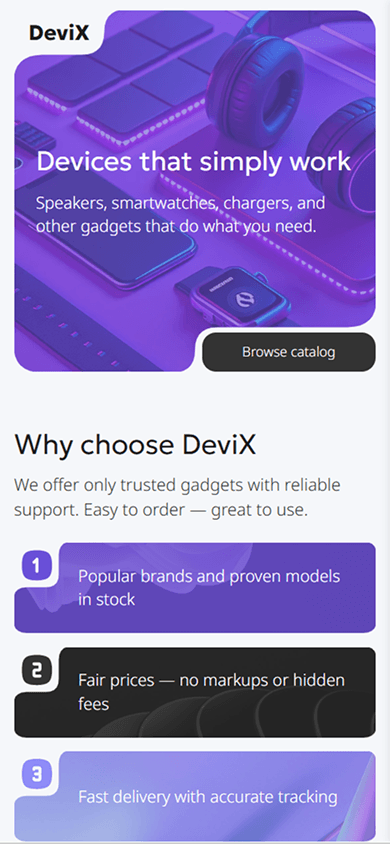

Taplink offers Universe users a familiar way to build a site. You can arrange text, images, buttons, and other elements on a grid. You can do this with the Custom block graphic editor, starting with a template or creating a design from scratch.
There’s also a simpler option: stack ready-made blocks vertically, as you would in a typical link-in-bio tool. For example, add text, an image gallery, a service list, or an inquiry form.
You can use both options on the same page.
Here’s what else Taplink offers users looking for a Universe replacement:
- More affordable pricing: Taplink has a free Basic plan. Paid plans cost $4 a month for Pro and $8 a month for Business when you pay for a full year.
- No transaction fees: Taplink doesn’t charge a fee on your sales. For comparison, Universe charges up to 5%, depending on the plan.
- More payment options: Taplink supports over 60 payment providers, compared to Universe’s two. You can connect PayPal, Stripe, Paddle, and local payment providers. This gives you more payment providers to choose from in the country where you want to sell.
- Data collection and a built-in CRM: Forms let you collect inquiries, orders, contact details, and other visitor information. All data is saved in the built-in CRM.
- Flexible design settings: You can customize your site to match your style. You can change colors, fonts, backgrounds, spacing, sizes, and other settings. Over 200 design themes are also available.
- Custom domain support: If you used your own domain with Universe, you can connect it to your new Taplink site.
- Built-in AI tools: AI will help you create a replacement for your Universe site faster. Briefly describe your business to generate a page with a design and content. Then add the images and videos you saved from Universe.
- Ready-made templates: You can also create a new site quickly by choosing a template for your niche. Then add your saved text, images, or videos. Over 100 templates are available for influencers, designers, consultants, beauty professionals, and other specialists.
While your Universe site is still online, you can build a new site and test everything. Sign up for Taplink and create your new site. That way, your visitors know where to find you after Universe shuts down.
Universe is a no-code website builder. Users can create portfolios, service pages, and online stores. Its visual editor lets them arrange text, images, buttons, and other elements on a grid. They can choose a template or create a design from scratch. The service also lets users sell physical and digital products, collect email addresses, and track site traffic.
Websites stay online until December 31, 2026. Until that date, users can manage their sites and update their content.
Yes. If you bought your domain from another registrar, you don’t need to transfer it. Just update its DNS settings using your new website builder’s instructions. The domain will then point to your new site.
If you registered your domain through Universe, you can transfer it to another provider. Then connect it to your new site, such as one built with Taplink.
No, you can’t export the entire website. Universe’s export tools let you save images, videos, and text, and download mailing lists and order histories. You’ll need to rebuild your website in another builder.
Use Taplink as a Universe alternative. Taplink offers a familiar grid editor, flexible design settings, and custom domain support. Its built-in AI builder and over 100 templates help you create a site quickly.
You can sell digital products and services, accept payments, and collect customer email addresses, inquiries, and other data. Taplink doesn’t charge a fee on your sales and supports over 60 payment providers. Its built-in CRM helps you manage customer data, and analytics help you track how your website is doing.