What is Gumroad? Explaining how it works, its pricing, and features

- What is Gumroad and how does it work?
- What can you sell on Gumroad?
- What features does Gumroad have?
- Product pages
- Customization
- Built-in CRM
- Marketing tools
- Gumroad Discover
- Built-in analytics
- Payments and payouts
- Sales fees
- What is Gumroad pricing?
- What are Gumroad’s pros and cons?
- Pros
- Cons
- What is similar to Gumroad?
- FAQ
- What is Gumroad all about?
- Is Gumroad a good place to sell?
- What is the Gumroad commission?
- Is Gumroad safe?
- What Is the Gumroad App?
- What is an alternative to Gumroad?
Gumroad is an e-commerce platform for selling digital products and services. It lets creators monetize their work without building their own website. You can create a product or service page in Gumroad in 15 minutes and start selling right away.
You can promote your digital products and services yourself. You can also use Gumroad’s built-in marketplace to reach potential customers. It automatically displays your products to people who may be interested in them.
Gumroad also includes email marketing tools for sending bulk emails and creating automated email sequences.

You can sell almost any type of digital product on Gumroad, including:
- Digital downloads.
- eBooks.
- Courses.
- Video lessons.
- Tutorials.
- Guides.
- Templates.
- Software.
- Music.
- Memberships.
- Custom services.
- Calls.
Gumroad supports recurring payments for memberships.
You can sell products or services at a fixed price, offer them for free, or let customers pay what they want.
Gumroad doesn’t focus on physical goods because it doesn’t offer features like delivery setup or tax calculations.
Gumroad is an all-in-one platform for selling digital products, managing customers, running email campaigns, and analyzing product statistics. Let’s look at its core features.
You can create a separate page for each item in your Gumroad store. Each page works as a standalone landing page that you can share via a direct link or embed on your website.
The landing page displays essential information about your product or service, such as its name, price, description, images, or video.
Limited customization is one of Gumroad’s main drawbacks. You can only customize:
- The text font.
- The background color.
- The accent color.
These limited options make it difficult to create a page that matches your brand and stands out.
For example, here’s how pages of different digital products and sellers look:


When a customer purchases your product or service, their data automatically appears in your built-in CRM. The CRM shows:
- Customers’ email addresses.
- Customers’ names.
- Purchased products and services.
- Purchase dates.
- Purchase prices.
You can filter customers by product, price, country, purchase date, and status.

Gumroad includes built-in marketing tools to help creators grow their audience and increase sales.
For example, you can offer discount codes and run time-limited promotions.
You can also use Gumroad to send email campaigns. You can set up two types:
- Broadcasts: Let you send the same email to your entire audience or a specific segment.
- Workflows: Let you automatically send emails based on triggers such as an abandoned cart or canceled subscription.
Upselling is another Gumroad marketing feature. You can offer additional items during or after checkout. This is useful if you sell multiple similar products or services.
Gumroad Discover is a built-in marketplace that helps creators promote their products to potential customers.

To have your product appear on the Discover page, you must meet certain Gumroad requirements. For example, your account must have at least $100 in genuine sales and pass Gumroad’s risk review.
This sounds useful, but it also has a significant drawback. When a customer purchases your product through the Discover page, you pay Gumroad’s highest fee: 30% of the sale. We’ll explain Gumroad’s fees in more detail below.
The Gumroad dashboard includes basic analytics to help you understand how your products perform. You can track:
- Views.
- Sales.
- Revenue.
- Traffic sources.
- Visitor locations.
- Email subscribers.
- Membership unsubscribers.

This helps creators understand which products are most popular and focus on the traffic sources and countries that generate the most income.
Gumroad offers two ways to receive payouts:
- Bank account.
- PayPal.
You can’t select both methods, so you must choose one. Bank account payouts are available only in some countries, including Belgium, Sweden, Thailand, Spain, and others. If you can’t connect a bank account in your country, you’ll have to use PayPal.
This limited choice can be a downside for international sellers. If PayPal is your only option, you may have trouble accepting payments from countries where it isn’t available.
However, if you sell only in Europe or the US, you may have no issues receiving payments.
Gumroad also supports purchasing power parity. This lets you adjust product prices based on the cost of living in different countries.
There are several pricing models you can set:
- Fixed price: Customers pay the amount you set.
- Pay-what-you-want: Customers can pay whatever they think your product is worth.
- For free: Customers can get your product or service for free.
After a purchase, Gumroad automatically delivers your product to the customer’s email address.
Gumroad charges a fee on every sale.
If a customer buys your product through a direct link, the fee is 10% + $0.50 per transaction. Payment processing fees are charged separately.
If the purchase happens on the Discover page, you pay the highest fee: 30% of your product’s price.

Gumroad has no monthly subscription fee. Instead, it charges a fee for every paid transaction.
This pricing model can be both an advantage and a drawback. It benefits beginners because there are no upfront or monthly costs. You only pay when you make a sale.
However, transaction fees can become relatively high as your sales grow, especially the 30% Discover fee. This significantly reduces profit margins on marketplace sales.
- ✅ No monthly subscription: You pay transaction fees instead of a monthly platform fee.
- ✅ Quick store setup: You can create a digital product page in about 15 minutes and start selling immediately.
- ✅ Built-in marketing tools: Email marketing, discount codes, and upsells let you market your products without connecting additional tools.
- ✅ Built-in marketplace: Gumroad can promote your products on the Discover page, helping you reach more customers.
- ❌ High transaction fees: Fees can reach 30%, significantly cutting into your earnings.
- ❌ Limited storefront control: Online stores look similar, making it difficult to show your unique style and stand out.
- ❌ Limited payout methods: Having only two payout methods can be inconvenient, especially for international sellers. Bank account payouts are supported only in some countries, while PayPal is unavailable in many regions.
- ❌ English-only interface: Gumroad doesn’t support languages other than English, which makes it harder for non-English speakers to use.
Taplink is a Gumroad alternative for creators who want to monetize their content and build a stronger personal brand.
While Gumroad primarily focuses on product checkout, Taplink lets you express your personality through your online store. You can create a mini landing page where you can add digital products, information about yourself, and other useful content.
Here are a few examples of pages you can create in Taplink, including a photography store, a marathon landing page, and a guide landing page.
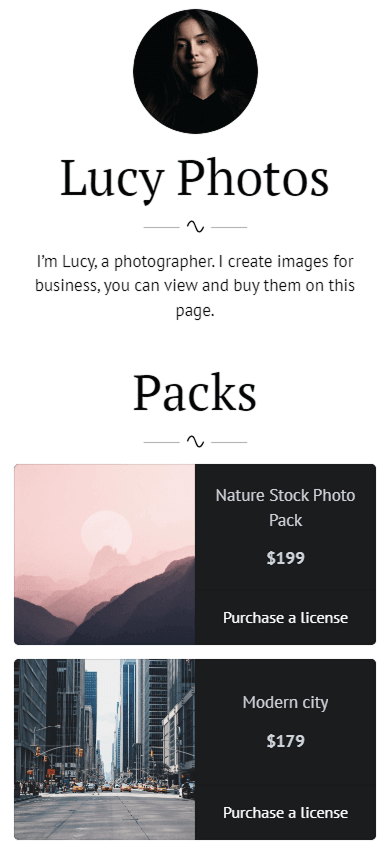


Taplink can be a better fit if you want to:
- ✅ Provide more info: Instead of a simple product page, you can create a mini landing page to tell people about yourself, share links, images, and videos, collect customers’ emails, sell digital products, and more.
- ✅ Get full page design control: With Taplink, you can create a unique page that stands out. You can customize layouts, backgrounds, fonts, buttons, animations, and more to match your style and audience.
- ✅ Keep more of your earnings: Unlike Gumroad, Taplink charges a 0% fee on sales. Instead, you pay for a pricing plan, with the highest plan costing only $8/month.
- ✅ Accept payments globally: You can connect 60+ payment providers, including PayPal, Stripe, Paddle, and many local providers. This helps you sell to audiences in different countries without technical limitations.
Taplink also supports custom domains, built-in analytics, and integrations with email marketing, advertising, analytics, and sales tools.
There are three ways to create a Taplink page:
- Using the built-in AI: The AI builds a page with a custom structure and content in 15 seconds.
- From a template: You can choose from 100+ page templates with pre-made content and structure. There are templates for musicians, designers, photographers, course and guide creators, and more.
- From scratch: This option lets you create your page’s content and design from a blank page.
The screenshots below show the variety of Taplink templates.

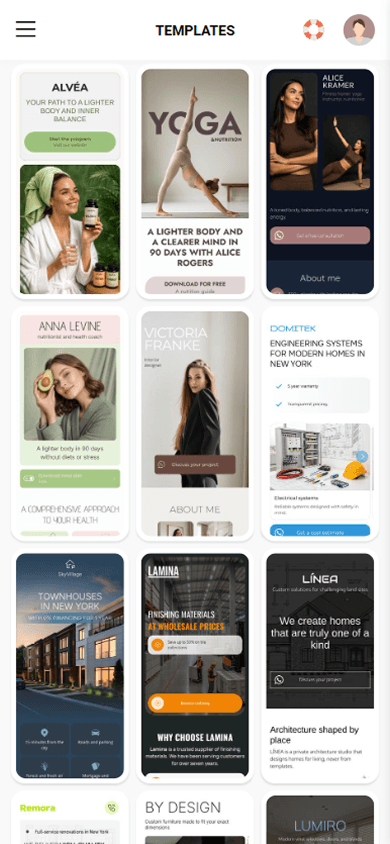

Taplink offers its interface and templates in multiple languages, including English, German, French, Italian, Spanish, and more. You can easily create a page in the language you speak.
Taplink pricing is straightforward: the plan with sales features costs $8 per month. There is also a free plan you can use to test the platform before upgrading.
To start creating your online store, sign up for Taplink. If you still have questions, learn more in the guide to creating a product page and setting up digital products.
Gumroad is an e-commerce platform that allows creators to sell digital products, services, and memberships. You can create a product landing page and use built-in marketing features to promote it.
Gumroad may work well if you’re a solo creator with relatively low sales who doesn’t need a branded store with a unique design. Otherwise, consider alternative tools.
Gumroad charges a commission on each sale. Usually, the commission is 10% + $0.50 per transaction. However, if your product is purchased through Gumroad’s Discover marketplace, you’ll pay the highest fee of 30%.
Yes, Gumroad is generally a secure platform for both sellers and buyers. It uses protections such as PDF stamping, IP tracking, HTTPS, and SSL data encryption.
The Gumroad app is a mobile dashboard for sellers. It is available for iOS and Android. You can use it to check statistics such as visits, purchases, and earnings. You can’t manage your Gumroad store as fully in the app as you can in the web version.
Taplink can be an effective Gumroad alternative if you want to:
- Have a unique page for selling products.
- Tell more about yourself and your work.
- Accept payments through 60+ payment processors.
- Pay a 0% seller fee.